Image to Notes AI

Image to Notes AI

Turn screenshots, board photos, textbook images, and readable study photos into structured notes you can review.

Supports Screenshot, Photo, Whiteboard, Flashcards

HomeReaction pathway study notes
New Session

Upload a study image. Get notes you can actually review.

Switch between a board photo, a screenshot, and a textbook image to see readable content become structured notes.

Source-grounded
ORG CHEM · CH 8 · Transition States
Ch.8 Transition States
– ΔG‡ = activation E
– catalyst lowers ΔG‡
– look up: Eyring eqn
化学小分队 (12)2

@你 兄弟 你也拍了今天那个反应式吗 能不能发我一下

14:31 · just now

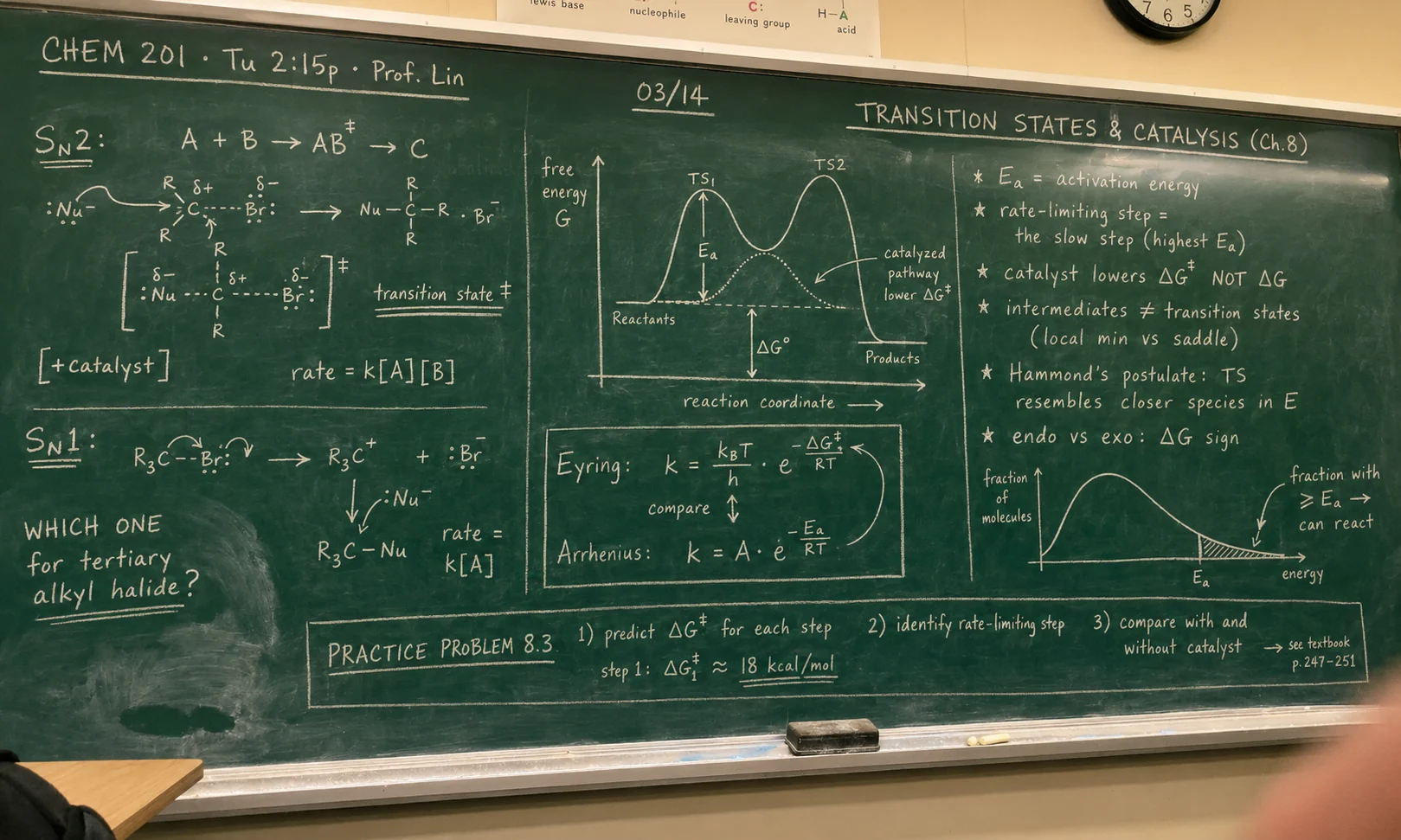
Chemistry chalkboard photo from CHEM 201 lecture
REC · IMG_4821OCR · 99% · 23 LABELS
14:32:08 · 5 labels · 4 equations · 2 figures · linked to "Organic Chem · Ch 8"
Detected text
  • SN2 and SN1 mechanisms drawn side-by-side
  • Free-energy diagram with TS1 / TS2 peaks
  • Eyring and Arrhenius equations boxed and compared
Key takeaway

When the board has 20+ items in 6 different colors of chalk and your photo is the only record.

Generated

Transition states & catalysis — lecture notes

Source-grounded
8 sections · 37 bullets· 8 cards· 4 quizest. 10-min review
AI Notes

Transition states & catalysis — lecture notes

📍Chapter context

  • Course: CHEM 201 · Prof. Lin · Tu 2:15p · 03/14.
  • Topic banner: Transition States & Catalysis (Ch. 8).
  • Why it matters: Sets the conceptual frame for everything in kinetics this term.
  • Reading: Textbook §8.4–§8.9, p. 247–251.
  • Exam relevance: Two midterm questions historically come from this material.

🧪SN2 mechanism

  • Reaction: A + B → AB‡ → C — concerted, single-step.
  • Transition state: AB‡ is a saddle point where bond-making and bond-breaking happen simultaneously.
  • Stereochemistry: backside attack causes Walden inversion of configuration at the C centre.
  • Rate law: rate = k[A][B] — second order, depends on both substrate and nucleophile.
  • Partial charges: δ⁺ / δ⁻ on the carbon and leaving group highlight the developing dipole in the TS.

🔁SN1 mechanism

  • Two steps: R₃C—Br ionises to a carbocation R₃C⁺ + Br⁻, then nucleophile attacks: R₃C⁺ + :Nu⁻ → R₃C—Nu.
  • Intermediate: the carbocation is a real species (local minimum) — distinct from a transition state.
  • Rate law: rate = k[A] — first order, only depends on the substrate.
  • Stereochemistry: the planar carbocation can be attacked from either face → racemization.
  • Board question answered: for a tertiary alkyl halide, SN1 dominates — steric crowding blocks SN2 backside attack and bulky R groups stabilise the carbocation.

📈Energy diagram

  • Axes: x = reaction coordinate, y = free energy G.
  • TS1 and TS2: two peaks on a multi-step pathway; reactants and products sit in energy wells.
  • ΔG°: standard free-energy change of the overall reaction (products − reactants).
  • ΔG‡: free-energy of activation: height of each barrier from preceding minimum.
  • Catalysed path: dotted lower curve — same products and same ΔG°, but lower ΔG‡.

Activation energy & rate

  • E_a: activation energy = the barrier the reactants must overcome to reach the TS.
  • Rate-limiting step: in a multi-step mechanism, the slow step is whichever has the highest E_a — it sets the overall rate.
  • Temperature effect: raising T shifts the Boltzmann distribution so more molecules have ≥ E_a → reaction speeds up.
  • Catalyst rule: lowers ΔG‡ via an alternative pathway. Does NOT change ΔG, K_eq, or product distribution.

🌡️Eyring vs Arrhenius

  • Eyring: k = (k_BT/h)·e^(−ΔG‡/RT) — thermodynamic form, uses free energy of activation.
  • Arrhenius: k = A·e^(−E_a/RT) — empirical, A = pre-exponential factor (attempts/sec).
  • Decomposition: ΔG‡ = ΔH‡ − TΔS‡; Eyring exposes entropy of activation, Arrhenius does not.
  • Both predict: rate constant grows exponentially with temperature.

🏷️Key definitions

  • Intermediate ≠ TS: intermediate = local energy minimum, has measurable lifetime. TS = saddle point, no lifetime.
  • Hammond's postulate: the TS structurally resembles whichever species (reactant or product) it is closer to in energy.
  • Endo vs exo: sign of ΔG: exergonic (ΔG < 0) is product-favoured; endergonic is reactant-favoured.
  • Catalyst caveat: alters mechanism only — equilibrium constant K and ΔG remain unchanged.

📝Practice problem 8.3

  • Task 1: predict ΔG‡ for each step of a given multi-step mechanism.
  • Task 2: identify the rate-limiting step (highest ΔG‡).
  • Task 3: compare the energy profile with and without a catalyst.
  • Worked step 1: ΔG‡_1 ≈ 18 kcal/mol — set this as the bar to beat for the catalysed path.
  • Reading: see textbook p. 247–251 for two more worked examples.

Make Visual Study Material Easier To Review

ThetaWave helps convert readable images into structured notes, so photos from class can become study material instead of staying buried in your camera roll.

Screenshots to notes

Turn screenshots of online lessons, slides, diagrams, and explanations into cleaner notes.

Board photos

Capture readable whiteboard or blackboard photos and convert the main points into study structure — useful during exam prep.

Readable handwriting

Use clear handwritten notes as source material when the text is legible enough for AI extraction.

Printed text and textbook photos

Convert readable textbook pages, worksheets, and printed handouts into organized notes.

From image to active recall

Turn extracted notes into flashcards and quizzes for review.

Multilingual notes

Generate notes in supported languages when studying across languages — useful for international students.

Editable after generation

Review and adjust generated notes when diagrams, handwriting, or image quality need correction.

How Image to Notes Works

Upload → AI extracts readable content → study-ready notes.

01

Upload a clear image

Add a screenshot, board photo, textbook image, or readable handwritten note.

ScreenshotPhotoBoard
02

ThetaWave extracts study content

The AI identifies readable text, main ideas, and concepts that can be turned into notes.

OCRConceptsStructure
03

Review and keep studying

Edit the generated note if needed, then create flashcards, quizzes, or summaries from the same material.

NotesEditReview

Who Uses Image to Notes AI?

See how different students use this tool to study smarter.

For STEM Students

Photograph board work and diagrams from STEM lectures and turn them into review notes.

Daily Study Sessions

Convert your classroom photos into study material for your daily review routine.

Exam Prep

Turn last-minute board photos and screenshots into structured exam-prep notes.

For Students with ADHD

Capture material in the moment instead of typing — fewer steps fits ADHD-friendly workflows.

What Students Are Saying

"I take photos of my professor's whiteboard every class. Now those photos turn into actual notes I can review."

Daniel Wu

UCLA

"Most of my textbooks are physical. Snapping a page and getting structured notes saves me hours of retyping."

Hannah Becker

TU München

"Screenshots from online lectures used to pile up. Image to Notes finally turns them into something I'll actually study from."

Layla Hassan

King's College London

Frequently Asked Questions

Everything you need to know about image to notes ai.

ThetaWave can work with clear, readable handwriting, but image quality matters. If the handwriting is messy, faint, or heavily angled, you may need to correct the generated note afterward.

Use bright, focused images with the text facing the camera. Avoid blur, glare, shadows, and extreme angles.

ThetaWave can help summarize readable labels and nearby explanations, but complex diagrams should still be reviewed for accuracy.

Yes. After the image is converted into structured notes, you can generate flashcards or quizzes from the extracted content.

No. Scanning captures an image. ThetaWave helps turn readable content inside the image into study notes and review material.

Turn Class Photos Into Study Notes

Upload a clear image, extract the key ideas, and continue into notes, flashcards, and quizzes.

Free to StartNo Credit Card RequiredResults in Under 2 Minutes
    Image to Notes AI | Turn Photos Into Study Notes | ThetaWave