
An online study room is useful when it solves the part of studying you struggle with: starting on time, working alone, or staying with one task. Before choosing a platform, decide whether you want a person expecting you on camera, silent company, or a virtual workspace with a timer.
Below are four starting points for those different needs, followed by three more options. Each recommendation explains the entry conditions and the reason to choose another format. If you only need background sound or a distraction blocker, see our broader guide to focus websites for studying.
Publisher disclosure: ThetaWave publishes this guide and offers ThetaWave Focus. Recommendations are based on the use cases below; they are not a ranking of measured learning results. Product information was rechecked on September 10, 2026; the walkthroughs and screenshots are from September 9.
Key takeaways
- Quiet company without a webcam: StudyClock offers free public rooms with an account, plus individual or shared timing.
- An appointment you have to show up for: Focusmate pairs you with one person on video. Its free plan includes three sessions per week.
- A virtual place and a concrete task: ThetaWave Focus combines an avatar, a study scene, a timer, and a checklist. An account is required, and some scenes have unlock conditions.
- A timer you can start without signup: Studuo's guest room works for solo timing. Buddy matching and the other shared tools require an account.
Compare the main options
Choose by the commitment you want to make today. An account requirement and a payment requirement are separate: a free room can still require signup.
| Option | Format | Entry and free access | Main reason to choose something else |
|---|---|---|---|
| StudyClock | Silent room; individual or shared timer | Account required; public rooms free | You want a named partner to check in with you |
| Focusmate | Scheduled one-to-one video session | Account required; three free sessions per week | You cannot stay on camera or commit to a booked time |
| ThetaWave Focus | Avatar-based room, scene, timer, and checklist | Account required; scene access varies | You want human check-ins rather than a self-directed task |
| Studuo guest room | Solo timer inside the study-room interface | No account for the guest timer; shared features require signup | You need the guest experience to include another person |
StudyClock: quiet company without a camera
StudyClock is a useful starting point if you study in a library, share a bedroom, or simply do not want to be on video. Its public study rooms require an account and cost nothing to join. The rooms use visible study status instead of cameras or microphones.
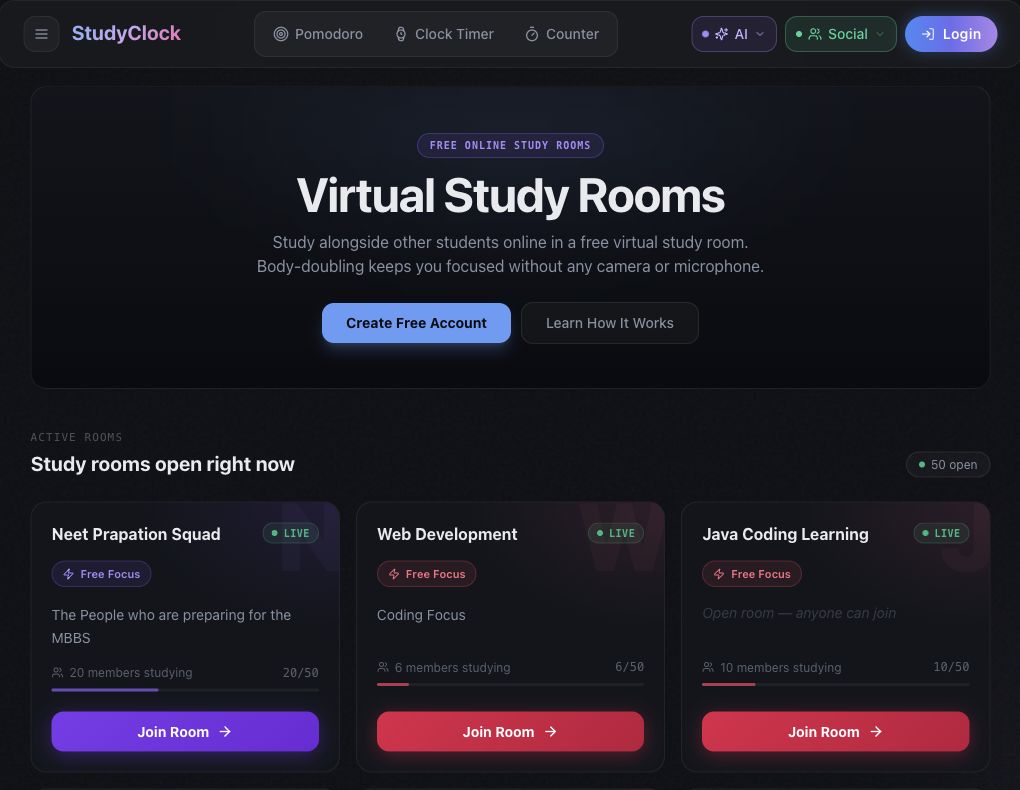
The useful distinction is between its two timer modes. According to the official room guide, Free Focus lets each person run a timer at their own pace. Synced Pomodoro gives the host control of a shared 25-minute focus period and a shared break. Choose individual timing when your reading and a friend's problem set need different amounts of time; choose synchronized timing when the group wants to stop and restart together.
To begin, browse the listing, sign in, and join a public room. Check its timer mode before settling in. The limitation is the same feature that makes it quiet: visible status offers less direct personal commitment than an appointment with one partner. The authenticated room controls are described here from the official guide; our browser check covered the listing and join destination.
Focusmate: a scheduled partner for a task you keep postponing
Focusmate suits a different problem: you know what to work on, but keep moving the start time. You book a 25-, 50-, or 75-minute session, meet one partner on video, state your goal, work independently, and check in at the end. That sequence is set out in its official walkthrough.
The commitment comes with a requirement: keep your camera on and remain visible throughout the session. A shared bedroom, an unreliable connection, or a schedule that changes every few minutes can make this format impractical. Your partner is there for accountability, not necessarily to tutor you in your subject.

For a first session, bring a bounded task such as “outline the introduction and choose the three sources I will use.” Create an account, book a time you can attend, and prepare the material before the call. If you want to study every weekday, the free allowance will not cover five sessions; check the current paid plan or consider a free group room.
ThetaWave Focus: a study scene with a timer and task list
ThetaWave Focus suits students who like a virtual place to work and want the next task visible. In our walkthrough, we entered Vinyl Bookstore, selected a seat, set a 30-minute timer, and added three checklist items. Starting the session placed our avatar in the room with the countdown and current checklist item on screen.
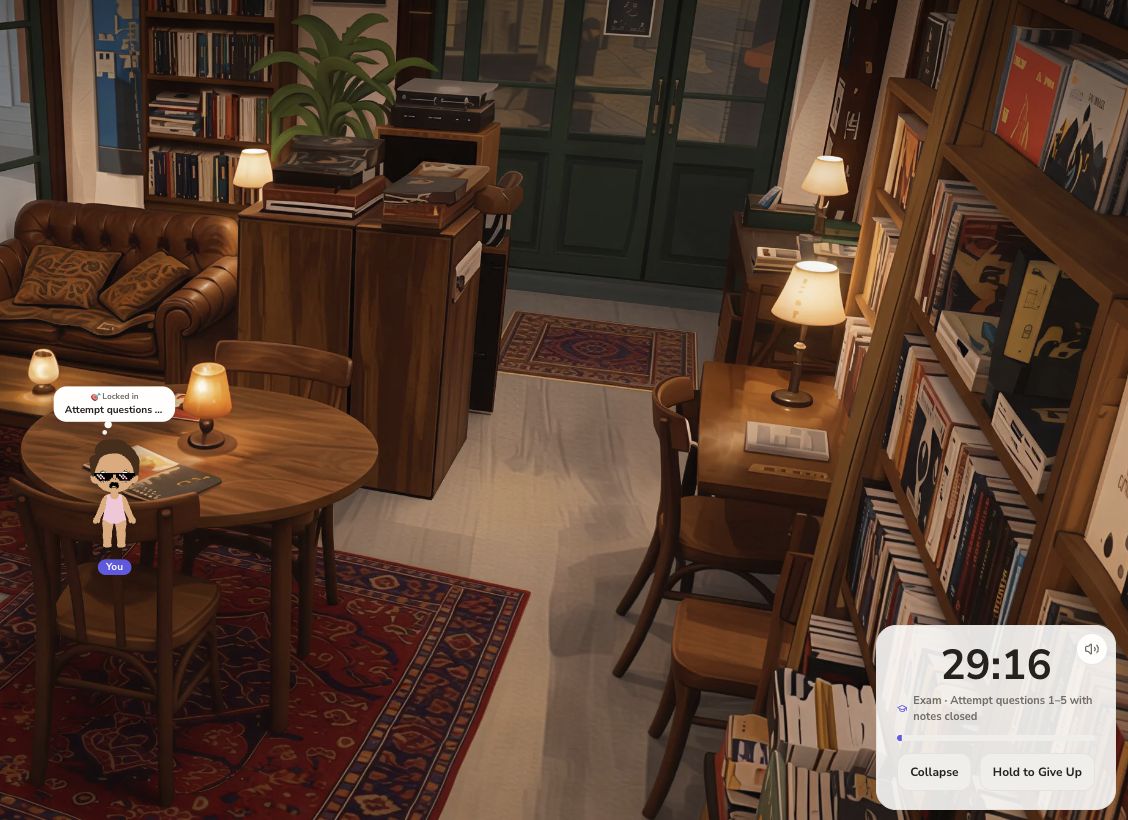
The practical sequence is: open Focus with an account, choose an available scene and seat, set the duration, then fill in the current task and checklist before starting. The room also has music and ambience controls. We used the avatar-based session without enabling a camera or microphone.
Bring a specific review task into that setup. For example, prepare a small question set from your notes, then work through it with the timer. Our guide to building a study system from your notes covers preparing that material; the room itself does not check whether your answers are correct.
Check scene access before choosing: Vinyl Bookstore was available in the account used for this walkthrough, while Hunter's Cabin showed a three-friend unlock condition. We do not describe every scene as freely available. Choose Focusmate instead if having another person hear your goal and check in afterward matters more than the virtual setting.
Studuo: try the guest timer before creating an account
Studuo's guest room is a quick option when you want to start now. We started its 25-minute timer and paused it at 24:50. You can inspect the interface and use that solo timer without signing up.
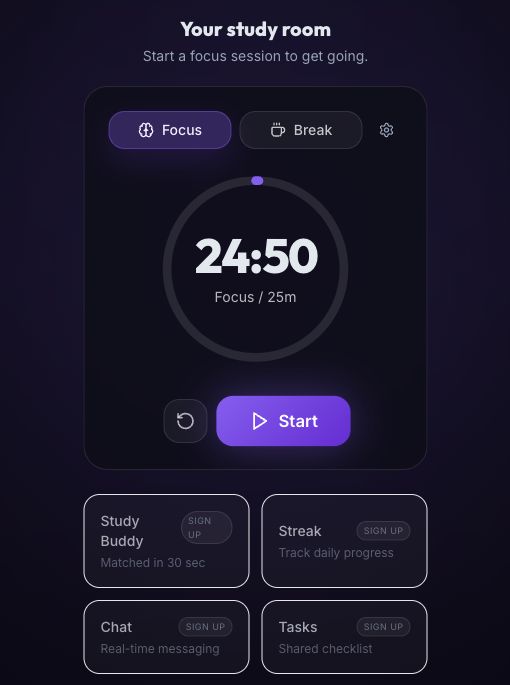
The limit is important if you searched for a room to study with someone: the guest timer is a solo experience. Study Buddy, Streak, Chat, and Tasks all displayed signup labels, and guest progress is not saved. The full service advertises subject-based buddy matching after account creation; matching availability was not part of our guest check.
Use the guest room for a low-commitment first block. If another person's presence is essential, choose a shared room or evaluate the signed-in buddy feature before relying on it for a scheduled study session.
Three more online study rooms to consider
These options serve additional needs. Their entry limits matter enough that we would check them before choosing one for a long session.
StudyStream: drop-in student community
StudyStream lists live community rooms you can join without booking a partner. Its web app let us reach Focus Room 1 as a guest, but displayed a remaining-time notice and a Register button. The Do Anything room explicitly required signup. Treat that guest view as a preview, not unlimited free access. Check the selected room's video prompts and rules, including its minimum age of 16. Study Together now directs new users to StudyStream, so they are not counted as separate choices here.
CSW: camera-based group study
CSW advertises free, unlimited study rooms with camera-on study streams and synchronized focus and break cycles. Its app entry led to login. Consider it if you want group video presence without booking a one-to-one appointment. The free-access description comes from the official student page; we did not join an authenticated CSW room. Check the room rules and whether video is practical in your study space.
LifeAt: ambience and planning in one workspace
LifeAt combines shared environments, synchronized timers, and chat/video tools. It is worth considering if you also want a planning workspace. Its pricing page lists a free plan with one to-do list and limited backgrounds; the daily planner is paid. That free-plan listing does not establish the free allowance for coworking. Confirm the feature you need after account entry, before organizing a group session around it.
A 30-minute study session you can copy
Whichever room you choose, give the timer a finish line. Here is an editor-created example for a short biology practice block. It illustrates the setup, not a completed student experiment.
Set the task to “Answer 5 biology questions, then check mistakes.” Pick questions from your own course material. Use three checklist items:
- Attempt questions 1–5 with notes closed. Spend the first two minutes choosing the questions, then roughly 20 minutes attempting them. Mark a question when you are stuck rather than opening another topic.
- Check answers against the course notes. Use the remaining time to compare your reasoning with the source or answer key.
- Write one correction to revisit. Record the missed idea or incorrect step, so the next study block has a clear starting point.
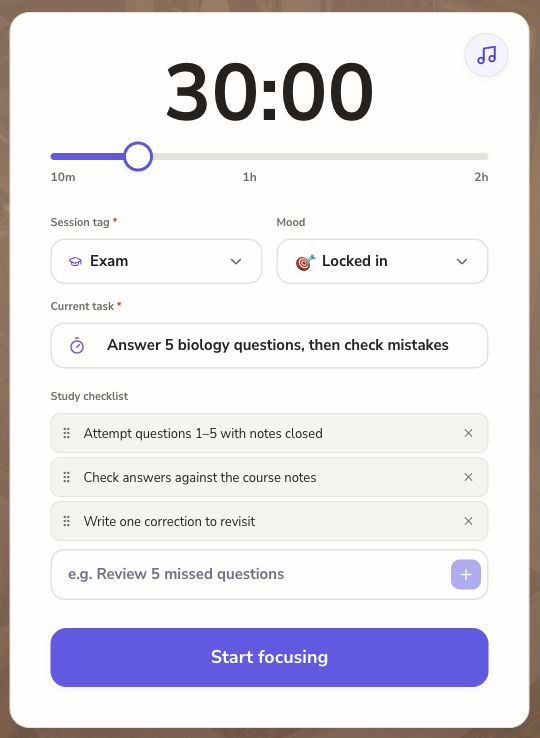
Adjust the time to the assignment. After a session, judge the setup by whether you began when intended, attempted the task, and checked your work. If you spent the block watching the room or choosing scenery, simplify the setup. If you kept leaving a silent timer, a booked partner may be a better next experiment.
How we checked these rooms
On September 9, 2026, we completed a short setup, start, and exit walkthrough in ThetaWave Focus and tested Studuo's guest timer. We rechecked the published terms and entry pages on September 10. The other comparisons use the official pages linked above, public listings, and accessible entry flows; we did not complete partner sessions or test paid features. We compared camera requirements, account gates, available timing formats, and published free limits. Screenshots are original browser captures. Displayed online counts were not used to rank the services, and the recommendations do not claim measured improvements in grades or focus.