
Choose a focus website by what interrupts your studying. Pomofocus is a straightforward place to start a timer and name a task. Focero adds a visual study background. Freedom addresses repeated trips to distracting sites. Focusmate gives you a booked appointment with another person. Those are different jobs, and the best choice depends on which one you need.
If you already use ThetaWave for study material, ThetaWave Focus offers a scene, avatar, goal, and room timer. Keep the specific notes, questions, or reading you will work on ready before entering. For a wider choice of live company, see the online study room guide.
Publisher disclosure: ThetaWave publishes this comparison and offers one of the listed services. These are recommendations by use case, not a ranking of measured learning gains. Product details were checked on September 13, 2026. The browser screenshots below are from our actual timer checks that day; the filled trial record is an explicitly fictional teaching example.
Key takeaways
- A timer without personal login: we started and paused Pomofocus and Focero without signing in. StudyFoc.us also ran after selecting “Continue anonymously.”
- A study background: Focero and StudyFoc.us provide visual environments; choose one before working, then leave it alone.
- Website blocking: opening a timer page does not block other tabs. StudyFoc.us requires its Chrome extension; Freedom requires installation on the devices you want to block.
- Sound: Noisli has a free account tier with daily streaming limits. Sound is optional; silence may suit your task better.
- Another person expecting you: Focusmate requires an account and camera, with three free sessions per week.
- A useful trial: record start delay and checked work, then decide what to change. The downloadable log includes a filled example and a blank version.
Focus website comparison
Access conditions below distinguish the free starting point from features that require extra setup or payment. Sources and the limits of our checks appear in the individual sections.
| Website and best use | Free access and setup | Limit that changes the choice |
|---|---|---|
| Pomofocus: a timer and named task | Basic timer and task creation worked without personal login or installation. | No website blocking. Some reports, integrations, and other features are Premium. |
| StudyFoc.us: timer with sounds and backgrounds | Timer worked through Continue anonymously. Its app also displayed a paid-plan offer. | Website blocking requires a Chrome extension; the timer alone does not enable it. |
| Focero: an aesthetic study background | Timer and task controls worked without personal login or installation. | A visual room is not a booked human partner or a distraction blocker. |
| Noisli: adjustable background sound | Free account: 16 sounds and 1.5 hours of streaming per day. | Advanced timer features are paid; full browser support is intended for desktop/laptop. |
| Freedom: block selected distractions | Free account and device installation; Start Now sessions up to two hours. | Scheduled sessions and Locked Mode require Premium. |
| Focusmate: a scheduled partner | Account, booking, and camera; three free sessions per week. | Video participation is part of the format. |
| ThetaWave Focus: a goal inside a shared room | Account and profile/goal setup for room entry. | Some scenes have unlock conditions; a scene is not a guarantee of personal accountability. |
For a phone, check the controls you actually need before settling on a service. Noisli specifically limits its full feature support to modern desktop/laptop browsers. A desktop blocker installation also does not automatically configure your phone.
How we evaluated these focus websites
We checked public product and help pages for all seven services. In desktop Chrome, we created a task and ran the timer in Pomofocus and Focero, and ran StudyFoc.us through its anonymous entry. We inspected ThetaWave's current room browser using an existing signed-in session and checked its room-entry requirements against the current study-room walkthrough. We did not create a new personal account, join a partner call, install a blocker, or purchase a plan for this comparison.
Noisli's sound features, Freedom's enforcement, and Focusmate's sessions are documentation-based comparisons, not hands-on performance tests. Timer operation does not establish background-tab accuracy, cross-device reliability, sound quality, or learning effectiveness. The three-session exercise below is a way to make a provisional personal choice, not a controlled experiment or a validated diagnostic.
1. ThetaWave Focus: best for starting from material already in your study workflow
ThetaWave Focus combines study scenes, an avatar, a written goal, a timer, and shared presence. Use a goal that names the work: “check four practice answers and explain each mistake” gives the session a finish line that “study chemistry” does not.
An account is required for room entry, and the profile/goal flow precedes the room. Some scenes have unlock conditions. We saw both available scenes and a locked scene in the current signed-in room browser; do not assume every background is immediately available to every account. The room-entry walkthrough shows the setup in more detail.
Choose this when a shared scene and goal help you begin. Choose a plain timer if you want less setup, or a booked partner if you want a specific person to expect you. Keep your course material available separately; a room timer is not evidence that the notes are accurate or the work is complete.
2. Pomofocus: best for a simple browser timer
In Pomofocus, we selected Add Task, entered “Solve 4 practice questions; check every answer,” saved it with one estimated Pomodoro, and started the default 25-minute timer. It counted down, and Pause stopped it. No personal login or installation was needed for those steps.
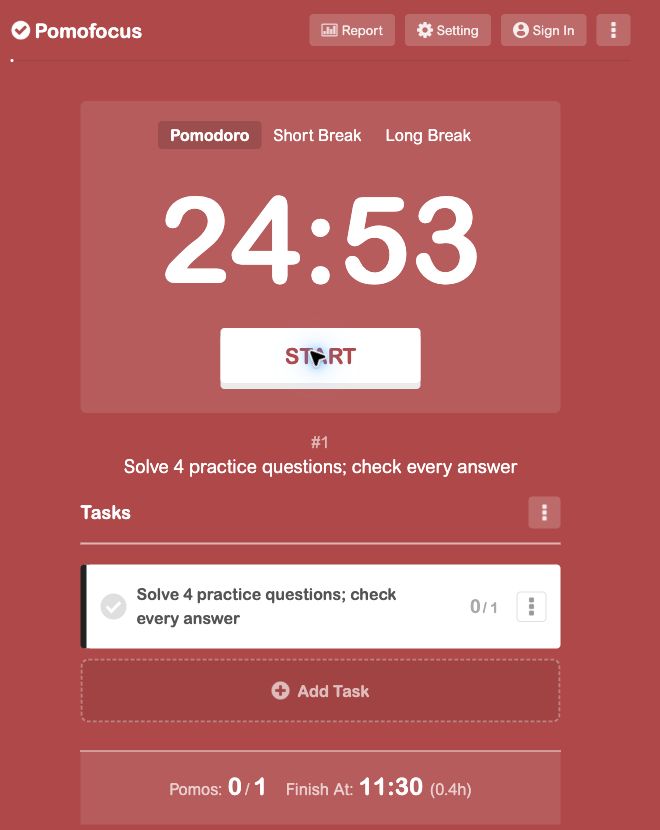
Our browser displayed a notice about blocked notifications; dismissing that notice let the timer run without changing notification permission. An alarm or notification should not be your only way to notice the end of a session.
Pomofocus's official page separates its basic timer/task features from Premium features such as report downloads and integrations. It is a good first option when you mainly need a visible start and stop. It does not stop you opening distracting tabs or make another person expect you.
3. StudyFoc.us: best for a timer with background controls
The StudyFoc.us website links to its web app. In our check, an email sign-in panel offered Continue anonymously. That route let us start and pause the 25-minute timer without entering personal login details. The interface also offered background sounds, task controls, and a Pomodoro/stopwatch switch.
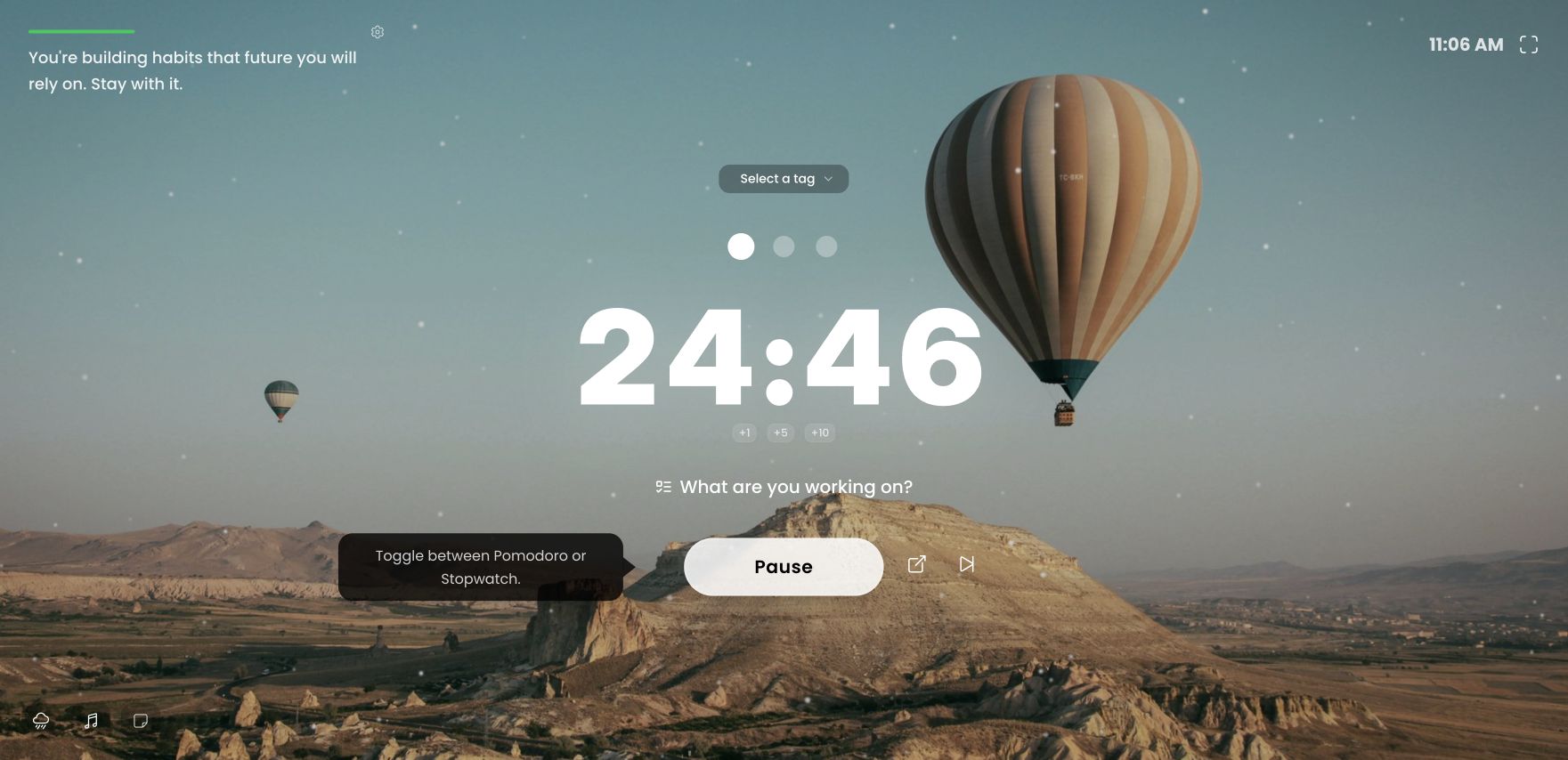
The Deep Focus control said to install the Chrome extension to block websites. We did not install it. A running timer alone therefore should not be treated as an active blocker. The app also displayed a paid-plan offer, so the free timer is not a promise that every feature is free.
Choose StudyFoc.us when you will use a timer and a small number of background controls together. If settings become the activity, return to a simpler timer. Its current public site also lists mobile apps; this walkthrough covers the browser.
4. Noisli: best for adjustable background sound
Noisli lets you combine ambient sounds and adjust their volumes. Its current plan page lists a free account tier with 16 sounds, 1.5 hours of streaming per day, five saved favorites, and a simple timer. The advanced timer and additional sound features belong to paid plans. Full feature support is intended for modern desktop/laptop browsers; mobile browsers may have limitations.
Those details come from official documentation. We did not sign up or run a listening comparison. Try a low-volume sound mix only if unpredictable noise is the problem, and compare it with silence on the same kind of reading. Stop if you begin following the sound instead of the text. Noisli does not replace a task, a website blocker, or a partner appointment.
5. Freedom: best for website and app blocking
Freedom is the dedicated blocker in this list. Its Free and Premium documentation distinguishes free Start Now sessions up to two hours from paid scheduling, longer sessions, and Locked Mode. Website exceptions are available on Mac and Windows; platform capabilities differ.
You need an account and installation on each device you want to include. We reviewed the documentation; we did not install Freedom or test whether a block can be bypassed. Treat “stronger blocking” as a difference in the controls offered, not a claim of unbeatable enforcement.
Choose Freedom if you repeatedly open the same distracting destinations despite knowing what to study. Before a short test, keep the course portal and required references accessible. Scheduling and locked sessions can be useful later, but they are not needed to discover whether a basic block addresses your problem.
6. Focusmate: best for scheduled one-to-one accountability
Focusmate uses a booked video session: greet your partner, state the task, work, and check in at the end. Its instructions require you to stay on camera. The free plan includes three sessions per week; more sessions require a paid plan.
We checked those public requirements, without booking or joining a call. Choose this format when a specific appointment is what helps you show up. It is a poor fit if you need silent, camera-free use or cannot commit to the booked time. A visual background or open study room can feel social, but it does not provide the same person expecting you at an agreed start.
7. Focero: best for an aesthetic study background
In Focero, we opened Focus Tasks, added “Solve 4 practice questions; check answers,” and started the 25/5 timer. The task appeared beside the countdown; Pause stopped it. Those controls worked without personal login or installation.
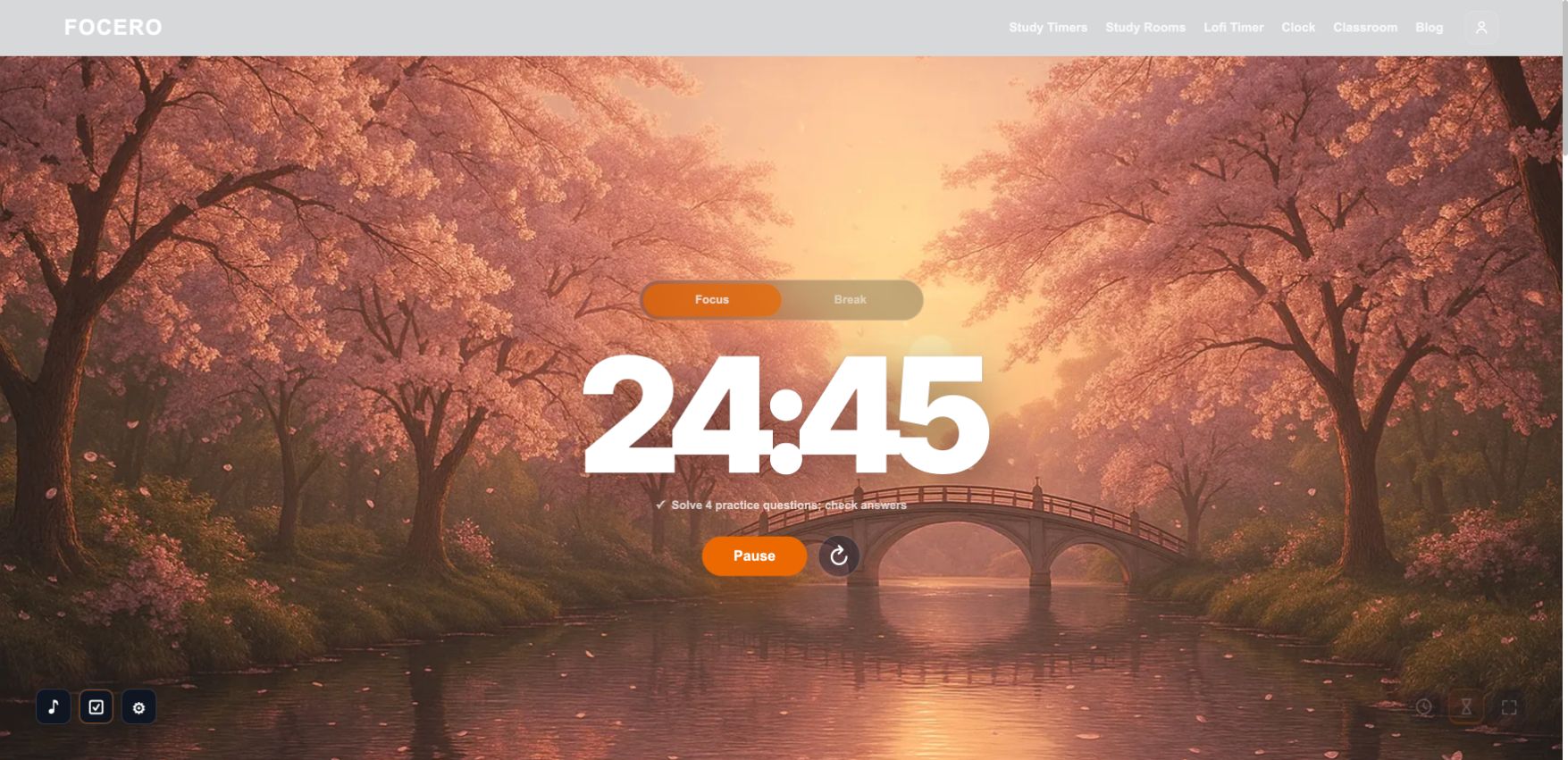
The official site lists study rooms, timer presets, clocks, tasks, and ambient audio. A “room” here can mean an aesthetic environment rather than another person studying with you. We did not test audio quality, all backgrounds, or long-session reliability.
For the study background website task, Focero is a direct starting point: open a scene, set the task, and run the timer. StudyFoc.us offers another visual approach. Choose one background before the session and change it during a break only if it is distracting.
Which focus website should you choose?
Start with the first point where your session breaks:
- You cannot begin: name one output and try Pomofocus. If an appointment matters more than a countdown, consider Focusmate.
- You begin but open unrelated sites: test a blocker. An ambient scene will not close those sites for you.
- The environment keeps interrupting: compare silence with low-volume sound, or use a stable visual background if it helps you settle.
- You want company around a prepared task: try ThetaWave Focus or the options in the study-room comparison, checking account and camera conditions first.
- You keep collecting tools instead of practicing: keep one timer and a paper task list for the next block.
The timer is a boundary around the work. If the work itself is unclear, use the study-method selector to choose a specific practice action before opening another focus website.
Run a three-session focus test
Use this as a small personal trial. Three sessions can reveal setup friction and suggest a next step; they cannot establish that a website caused better learning. Task difficulty, fatigue, and practice all vary.
1. Define one repeatable task
Choose similar-sized practice sets and the same time limit. For example: work for 25 minutes, attempt four course questions, then check all attempted answers against the answer key. Record correct answers before repair separately from corrections. Do not count a checked task box as a correct answer.
Prepare the questions and answer key before the planned start. Use your usual setup for session A and one website for B and C. Keep the subject and approximate difficulty similar. Later, reverse the order or collect more sessions if the apparent difference matters to you.
2. Use the completed record as a model
Original fictional teaching example, created September 13, 2026. These values demonstrate how to fill and interpret the log. They are not observations of a student or a test of any named product. The scenario targets late starts; the named website is deliberately left as “timer candidate.”
| Session and setup | Planned → actual start | Work and distractions | Check and next action |
|---|---|---|---|
| A: usual setup | 18:00 → 18:08; 8-minute delay | 3 of 4 attempted; 2 correct before repair; 4 off-task switches | Sign error on Q2. Correct the equation, then solve a similar question without the key. |
| B: timer candidate | 18:00 → 18:03; 3-minute delay | 4 of 4 attempted; 3 correct before repair; 2 off-task switches | Missed unit conversion on Q4. Write the conversion first on the retry. |
| C: same timer candidate | 18:00 → 18:02; 2-minute delay | 4 of 4 attempted; 3 correct before repair; 2 off-task switches | Explanation omitted an assumption. Add it, then explain a changed-condition question. |
Interpretation: the two timer sessions started sooner in this invented record, so late starts are worth watching in further trials. Correct work improved from 2 to 3 answers, but that does not isolate the timer's effect or establish retention. The record still calls for repairing errors. A reasonable next step is to keep the simple timer provisionally, test another comparable block, and retry one previous mistake without notes on a later day.
3. Download and fill your own log
Download the focus-session log: filled example + blank template (TXT). It is a plain text file you can edit in a text editor or paste into your notes. It contains the example above, three blank session blocks, and a next-decision field. No account is needed for this download. Print it from your text editor if you prefer paper.
For each session, record the setup time, planned and actual start, task, time limit, attempted and correct work, off-task switches, one error to repair, and the next check. Do not enter private course content into a public room goal. A short task label is enough.
Keep the tool provisionally when it addresses your chosen problem without adding more setup. Change the mechanism when you still leave the task: a timer and a blocker solve different problems. Stop using a tool if selecting scenes, monitoring people, or adjusting settings consumes the work period. For later recall, the active recall and spaced repetition guide explains how to revisit what you studied.
Common mistakes when using study focus websites
Calling a running timer completed study. Count the explanation, checked answer, paragraph, or repaired mistake you produced. Time alone cannot tell you whether it is correct.
Treating every “free” tool as unlimited. Anonymous timer access, a daily sound allowance, and a weekly partner-session allowance are different offers. Read the condition for the feature you will actually use.
Assuming an aesthetic room contains live people. A background is useful if it helps you start, but use a shared or booked format when another person's presence is the reason you are there.
Ignoring the trade-off. Video can be uncomfortable; sound can distract; blocking can hide a needed reference. Test the required controls on your device with a small task before making them part of every study session.
When one setup works well enough, return to the material. The next improvement may be a clearer question or a corrected explanation, rather than another website.